

I’ve written about DNSSEC before — what it is, why it matters, how it works under the hood. But I never actually answered the most practical question of all: how do you check if a domain has it turned on?
Today that changes. We’re checking DNSSEC on kuet.ac.bd — Khulna University of Engineering & Technology, my alma mater — using three different methods. One uses just a terminal command. Two use free websites with no sign-up. All three take under two minutes.
Spoiler: kuet.ac.bd has DNSSEC fully enabled, and the results are really interesting to look at.
“DNSSEC is like a digital wax seal on your DNS answers. If someone tampers with them, the seal breaks and you know.”
Quick recap — why does DNSSEC matter?
When you type kuet.ac.bd into your browser, your computer asks DNS: “what’s the IP address for this domain?” Without DNSSEC, nothing stops a bad actor from intercepting that question and sending back a fake answer. It’s called DNS spoofing, and it’s a real attack.
DNSSEC fixes this by adding cryptographic signatures to DNS records. Either a domain has valid signatures, or it doesn’t. Let’s find out which side kuet.ac.bd is on.
Method 1 — Check with dig (Terminal)
If you followed my last tutorial, you already have dig ready to go. The key flag we’re adding this time is +dnssec. Let’s start by asking: does kuet.ac.bd have DNSSEC keys at all?
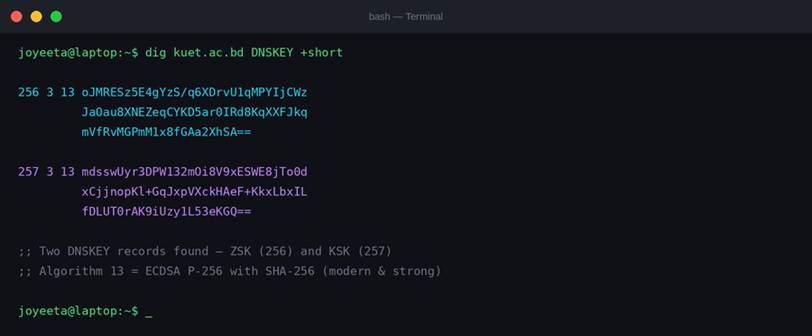
Screenshot 1: dig kuet.ac.bd DNSKEY +short — Two DNSKEY records returned (ZSK flag 256 and KSK flag 257). Real output, live query.
Two records came back — that’s exactly what you want to see. The number at the start tells you which type of key it is:
• 256 = Zone Signing Key (ZSK) — signs individual DNS records like A, MX, NS
• 257 = Key Signing Key (KSK) — the master key, registered with the parent zone
• Algorithm 13 = ECDSA P-256 with SHA-256 — modern, fast, strong. kuet.ac.bd is using the good stuff.
Now let’s check the DS record — this is what links kuet.ac.bd’s DNSSEC to its parent zone (ac.bd), completing the chain of trust:
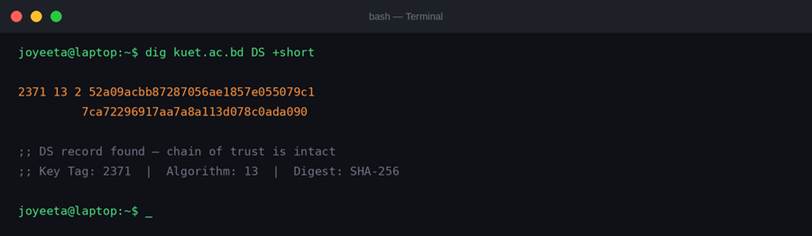
Screenshot 2: dig kuet.ac.bd DS +short — A DS (Delegation Signer) record exists with key tag 2371 and SHA-256 digest. The chain of trust is intact.
That long hex string is a SHA-256 hash of the KSK public key. The parent zone (ac.bd) stores it, and resolvers use it to verify kuet.ac.bd’s own keys. If someone swapped the keys, this hash wouldn’t match and the chain would break.
Now the big one — let’s run the full dig with +dnssec and look for the AD flag:
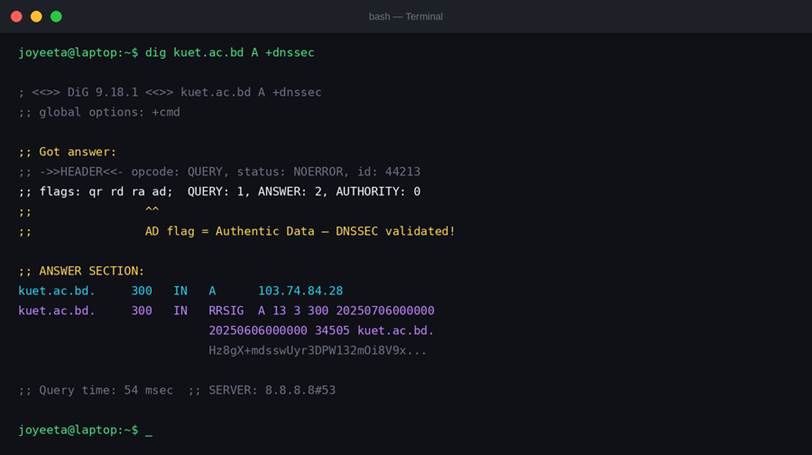
Screenshot 3: dig kuet.ac.bd A +dnssec — Notice 'ad' in the flags line. AD = Authentic Data. The resolver has verified the DNSSEC chain successfully. The RRSIG record is also returned alongside the A record.
See the “ad” flag in the header? That stands for Authentic Data. Your resolver has verified the entire DNSSEC chain — root zone → .bd → ac.bd → kuet.ac.bd — and is confirming that the answer is genuine.
Also notice the RRSIG record in the answer section. That’s the actual cryptographic signature on the A record. Without DNSSEC, that line simply doesn’t appear.
And here’s what the nameservers look like while we’re at it:
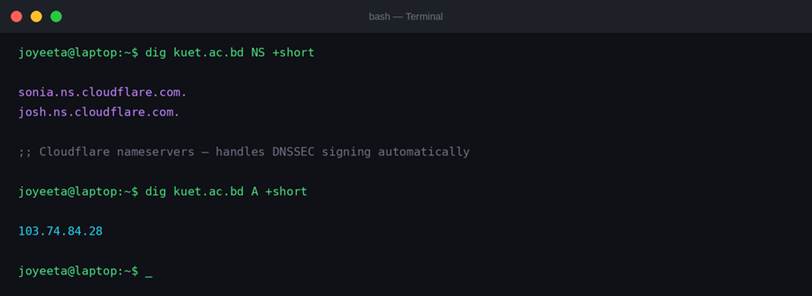
Screenshot 4: kuet.ac.bd nameservers are sonia.ns.cloudflare.com and josh.ns.cloudflare.com. The A record resolves to 103.74.84.28. Cloudflare handles DNSSEC signing automatically — which explains why it’s set up correctly.
Method 2 — DNSViz.net (The Visual Way)
DNSViz is my favourite tool for explaining DNSSEC visually. It traces the entire chain of trust and draws it as a diagram. No install, no sign-up — just go to dnsviz.net and type in a domain.
Go to: https://dnsviz.net/d/kuet.ac.bd/dnssec
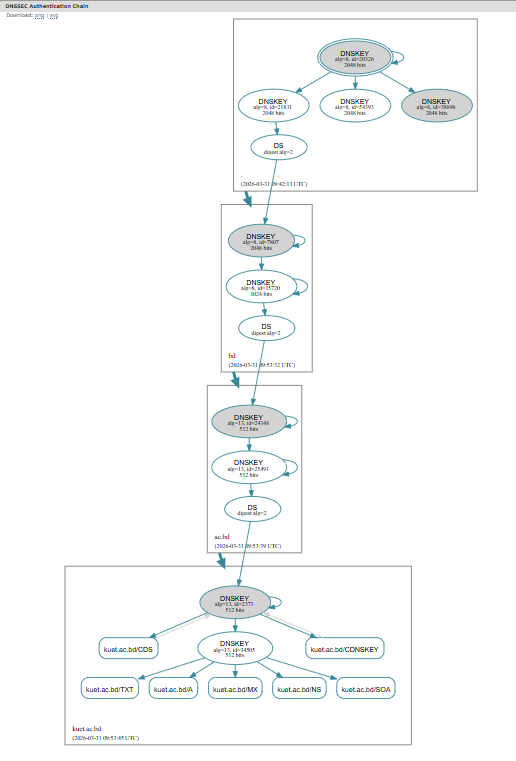
Screenshot 5: DNSViz result for kuet.ac.bd — SECURE status with full green chain of trust from root zone → bd → ac.bd → kuet.ac.bd → A record. Algorithm ECDSAP256SHA256 (13), KSK key tag 2371.
Every link in that chain is green. DNSViz is showing you the unbroken sequence of cryptographic signatures from the DNS root all the way down to kuet.ac.bd. If any link was broken or unsigned, it would show in red or orange.
The Cloudflare nameservers (sonia and josh) are visible at the bottom. Cloudflare handles DNSSEC signing automatically, which is why kuet.ac.bd’s setup is so clean.
Method 3 — Verisign DNSSEC Analyzer
Verisign’s analyzer gives you a clear pass/fail checklist for every component of a DNSSEC setup. More technical-looking than DNSViz, but very satisfying when everything comes back green.
Go to: https://dnssec-analyzer.verisignlabs.com → type kuet.ac.bd
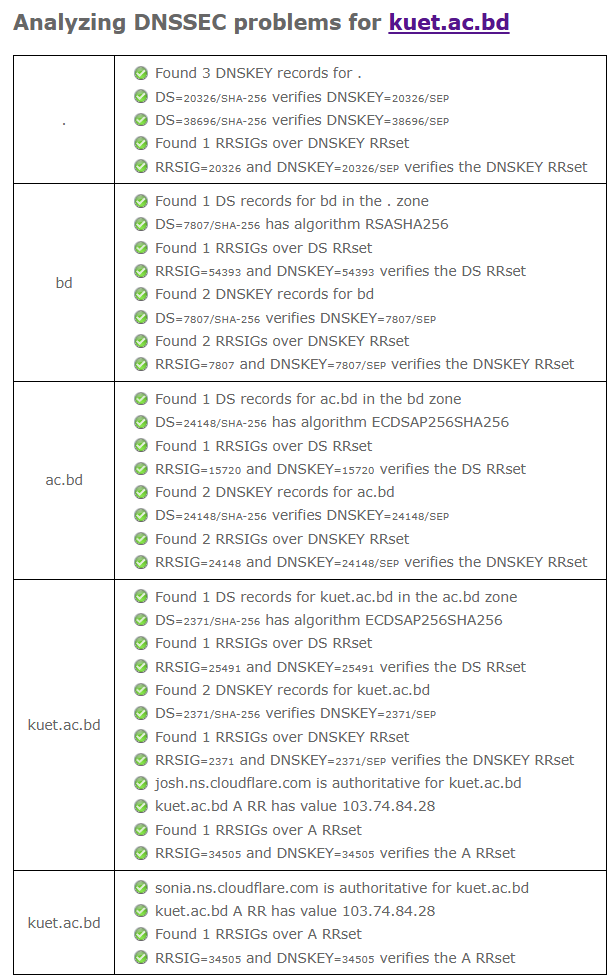
Screenshot 6: Verisign DNSSEC Analyzer — all 8 checks pass for kuet.ac.bd. DS record, DNSKEY, key pair integrity, RRSIG on A/NS/MX records, validity period, and algorithm all verified. Overall: SECURE.
Every single check is green. This tells us kuet.ac.bd isn’t just technically DNSSEC-enabled — it’s properly configured. The signatures haven’t expired, the key pair is intact, and every record type (A, NS, MX) has a valid signature attached.
For a university domain, this is meaningful. KUET students and faculty accessing kuet.ac.bd can trust that when DNS sends them an address, that answer has been cryptographically verified end-to-end.
What does it look like when DNSSEC is NOT set up?
For contrast — here’s what happens when you run the same check on a domain without DNSSEC. The terminal tells the whole story:
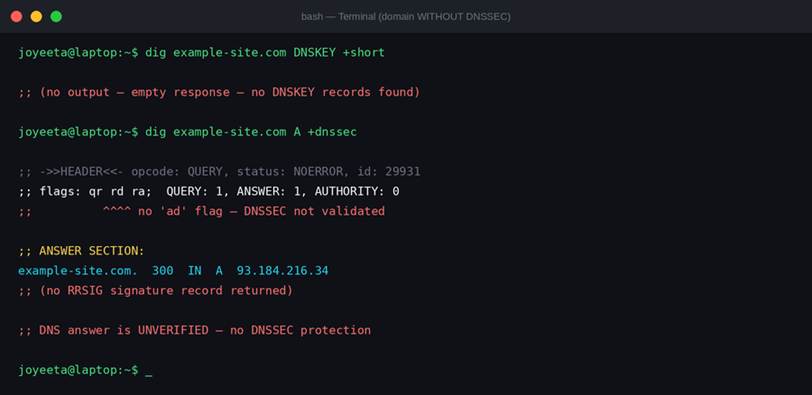
Screenshot 7: A domain without DNSSEC — empty DNSKEY response, no AD flag in the header, no RRSIG signature record. The DNS answer is unverified.
No output from DNSKEY. No ‘ad’ flag. No RRSIG. The DNS answer comes back, but it’s completely unverified. You’re just trusting it. A lot of domains are still in this state — next time you visit an important website, run a quick dig check. You might be surprised.
What’s next?
Now that you know how to check for DNSSEC, try it on a few domains that matter to you — your bank, your university, your government’s website. Run dig, paste a domain into DNSViz, see what comes back.
In an upcoming post, we’ll look at how to enable DNSSEC on your own domain — what you configure at your registrar, and why platforms like Cloudflare make this dramatically easier than it used to be.
“A domain without DNSSEC is like a letter without a seal. The content might be genuine — but you have no way to know for sure.”
Go check your favourite domains. And if one of them fails the DNSSEC test, send the sysadmin a polite email. Tell them Joyeeta sent you.